Android Studio
Android - 레이아웃
Starters
2020. 9. 21. 13:38
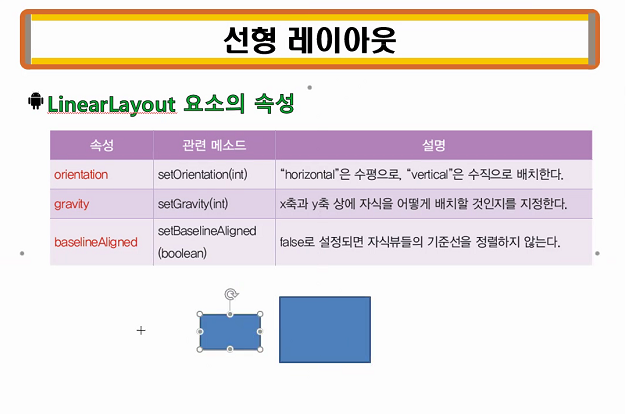
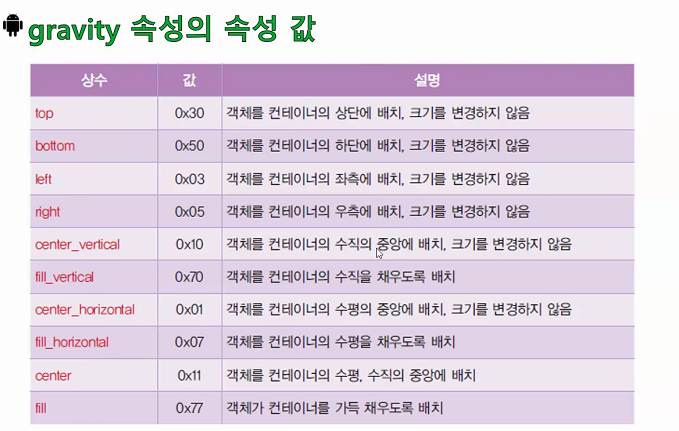
프로그래밍
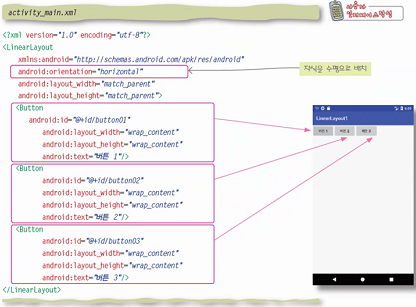
<?xml version="1.0" encoding="utf-8"?>
<LinearLayout
    xmlns:android="http://schemas.android.com/apk/res/android"
    android:orientation="horizontal"
    android:layout_width="match_parent"
    android:layout_height="match_parent"
    >

    <Button
        android:id="@+id/button01"
        android:layout_width="wrap_content"
        android:layout_height="wrap_content"
        android:text="버튼 1"/>

    <Button
        android:id="@+id/button02"
        android:layout_width="wrap_content"
        android:layout_height="wrap_content"
        android:text="버튼 2"/>

    <Button
        android:id="@+id/button03"
        android:layout_width="wrap_content"
        android:layout_height="wrap_content"
        android:text="버튼 3"/>


</LinearLayout>
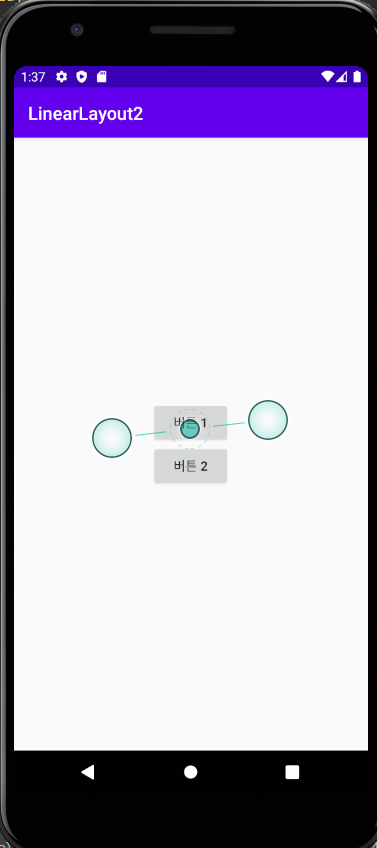
예제 2
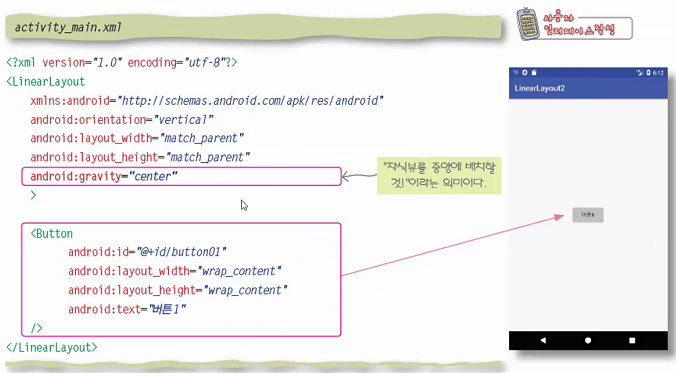
<?xml version="1.0" encoding="utf-8"?>
<LinearLayout
    xmlns:android="http://schemas.android.com/apk/res/android"
    android:orientation="vertical"
    android:layout_width="match_parent"
    android:layout_height="match_parent"
    android:gravity="center"
    >

    <Button
        android:id="@+id/button01"
        android:layout_width="wrap_content"
        android:layout_height="wrap_content"
        android:text="버튼 1"/>

    <Button
        android:id="@+id/button02"
        android:layout_width="wrap_content"
        android:layout_height="wrap_content"
        android:text="버튼 2"/>

</LinearLayout>
가중치
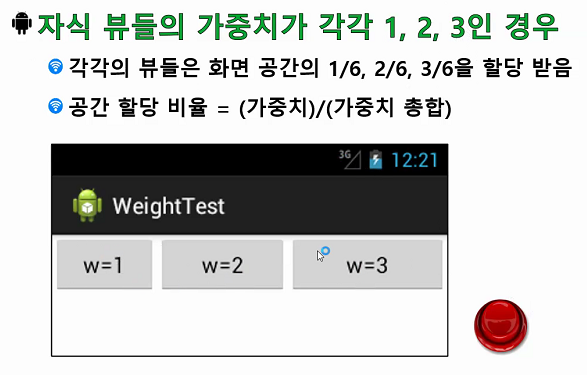
가중치를 명시하지 않으면 default 값은 0
가중치 적용 프로그래밍 실습 예제
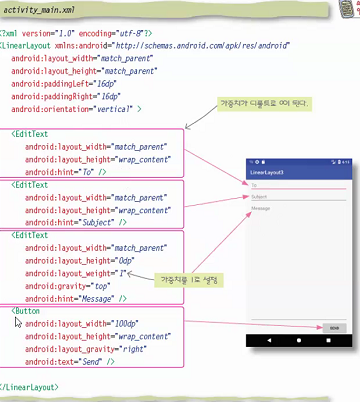
<?xml version="1.0" encoding="utf-8"?>
<LinearLayout
    xmlns:android="http://schemas.android.com/apk/res/android"
    android:layout_width="match_parent"
    android:layout_height="match_parent"
    android:paddingLeft="16dp"
    android:paddingRight="16dp"
    android:orientation="vertical"
    >

    <EditText
        android:layout_width="match_parent"
        android:layout_height="wrap_content"
        android:hint="To" />

    <EditText
        android:layout_width="match_parent"
        android:layout_height="wrap_content"
        android:hint="Subject" />

    <EditText
        android:layout_width="match_parent"
        android:layout_height="0dp"
        android:layout_weight="1"
        android:gravity="top"
        android:hint="Message" />

    <EditText
        android:layout_width="100dp"
        android:layout_height="wrap_content"
        android:gravity="right"
        android:hint="Send" />

</LinearLayout>
테이블 레이아웃
- 자식 뷰들을 테이블 형태로 배치
- TableRow 요소의 개수만큼 테이블의 행의 개수 생성
- TableRow 요소 안에 포함된 뷰의 개수만큼 테이블의 열의 개수 생성
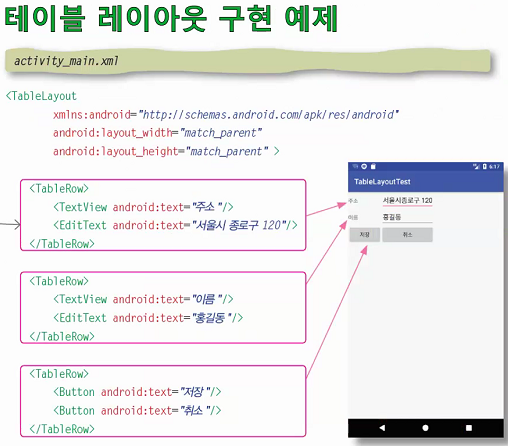
<?xml version="1.0" encoding="utf-8"?>
<TableLayout
    xmlns:android="http://schemas.android.com/apk/res/android"
    android:layout_width="match_parent"
    android:layout_height="match_parent"
    >

    <TableRow>
        <TextView android:text="주소"/>
        <EditText android:text="인천시 부평구 안남로260"/>
    </TableRow>

    <TableRow>
        <TextView android:text="이름"/>
        <EditText android:text="김응민"/>
    </TableRow>

    <TableRow>
        <Button android:text="저장"/>
        <Button android:text="취소"/>
    </TableRow>

</TableLayout>
상대적 레이아웃

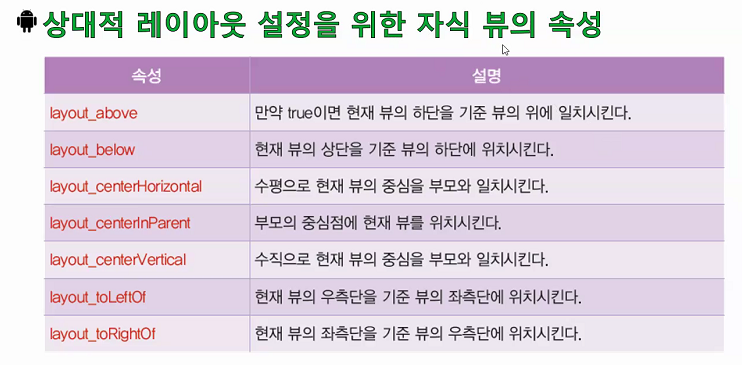
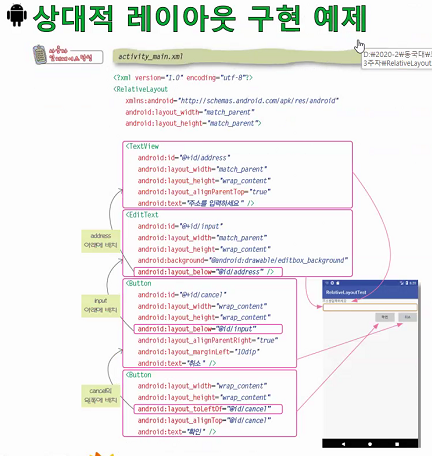
id 값을 통해서 상대적 위치를 참조한다.
자바로 레이아웃 구현
- 자바로도 레이아웃 구현이 가능하지만, XML로 레이아웃을 만드는 것을 권장
2020/09/21 - [Android Studio] - Android - 계산이 UI 구현
Android - 계산이 UI 구현
startersdev.tistory.com